
Refer to this article to learn how to switch between Agent types.
Review this article for the complete Agent specifications and supported platforms
The table below outlines the major differences between the Agent types to help you choose the right one for your monitoring needs.
Feature | Revealed Agent | Stealth/Standard Agent |
User Acknowledgement | Required. | Standard Agent: Required during installation. Subsequent updates don't require acknowledgements. Stealth Agent: Not required. No acknowledgement prompt is shown during installation or updates. Notifications from behavior rules, such as warning messages, are still shown if you set them up. |
Deployment Restrictions | No restrictions. | Stealth Agent: Available to vetted customers only. Standard Agent: Available to unvetted/trial accounts. |
User Interface | Has a user interface: 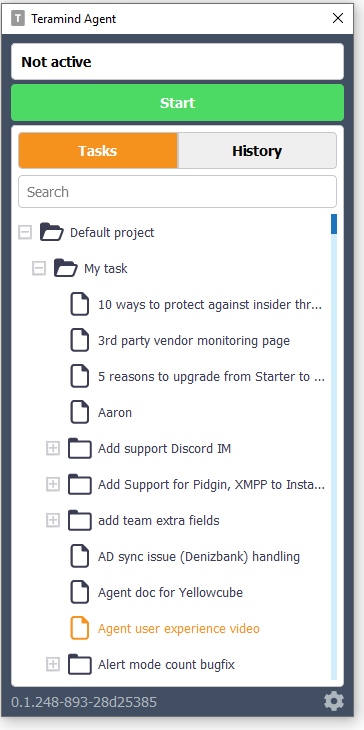 | Has no user interface. |
Starting Monitoring (Clock-in) | Monitoring begins only when the user signs into the Agent and clicks the Start button. | Users are monitored automatically as soon as they log into their local or domain account (no manual login required). |
Stopping Monitoring (Clock-out) | User can stop monitoring by clicking the Stop button in the interface. | Monitoring cannot be stopped by the user. |
Projects & Tasks | Users can create, select, and manage active tasks, sub-tasks, and view task history directly from the Agent's interface. | Users cannot manually create or choose a task. Tasks must be set up by an admin to be assigned automatically based on usage. |
Default Task | No default task is set by the system. | Admins can set a default task for all users. |
User Identification | Tracks the user who signs in to the Agent with their Teramind credentials. If several people share a computer, each one is identified by their own Agent login. | Tracks the user logged on to the computer, identified by their local or domain account. If that user doesn't have an employee account yet, one is created automatically, and each new account uses a license. |
User Profile Management | An admin must manually add the user and create a profile on the dashboard before installation. | The user/employee profile is created automatically on the dashboard upon the Agent's first connection. |
Computer Names | Computer names do not have to be unique. | Computer names must be unique. Only the first computer with a non-unique name will be monitored. |
Offline Recording | Not supported. | Supported. The Agent records activity when the network connection is lost. |
Offline Policy Enforcement | Supported, but only if the user was on an active session when the network connection was disrupted. | Supported regardless of session status. |
Locked Session Time | Does not count productivity or session time for locked sessions. | Productivity and session time are counted for locked sessions. |
Remote Lockout Action | Does not support the Employees > Lock or Rule > Lock Out actions. You can, of course, freeze keyboard and mouse input from the Session Player. | Supports the Employees > Lock and Rule > Lock Out actions as well as the freeze actions. |
Installation Methods | Supports local and remote installation. On Windows, you can deploy it remotely with the Remote Deployment Dashboard (on-premises), GPO, Intune, PsExec, etc. On Mac, you can deploy it with Jamf or another MDM. | Stealth Agent: Supports local and remote installation, including the Remote Deployment Dashboard, GPO, Intune, PsExec, Jamf, etc. The Standard Agent only supports local installation. |
Installation Privilege | Can be installed by the end-user. | Requires administrator privileges for installation. |
Installation Path (Windows) | See the installation path article. | See the installation path article. |
Installation Parameters | Supported. | Stealth Agent: Supported. Standard Agent: Not supported. |
Uninstall Protection | Revealed Agent (Mac): Supported. Revealed Agent (Windows): Not supported. | Stealth Agent (Windows & Mac): Supported. Standard Agent: Not supported. |
Primary Use Case | Best for transparent, non-obtrusive monitoring of remote employees, contractors, and freelancers who need to manage their time/tasks. | Stealth Agent: Optimized for discreet monitoring where user awareness is not required. Standard Agent: Offers the same robust monitoring capabilities as the Stealth Agent, but prevents unauthorized use and ensure privacy compliance. |